
Make it a Quote/ja
More actions
Make it a Quoteは、Neodylandが運営するQuote画像サービスおよびSNS Botです。メッセージや投稿を、テキスト、作者の表示名とユーザー名、そしてアバターを含む画像に変換します。 このサービスはDiscord、Bluesky、そしてMisskeyを含むFediverseのサービスで利用可能です。Quoteの生成方法はプラットフォームによって異なりますが、生成される画像の基本的なデザインやオプションは同じです。
 Make it a QuoteRelease status: stable Make it a QuoteRelease status: stable | |
|---|---|
 | |
| Service type | Discord & w:ja:Bluesky Bot |
| Description | Make it a Quote は、コンテンツから Quote を作成できる Bot です。Discord、Misskey (Fediverse)、Bluesky に対応しています。 |
| Provided by | Neodyland |
| Developer(s) | Neodyland |
| Maintainer(s) | Neodyland |
| Initial release |
|
| Platform | Discord, Bluesky, Misskey |
| Languages |
|
| Licence | プロプライエタリ |
| Website | miq.moe |
| Support | miq.moe/support |
使用方法
Discordでは、ユーザーがメッセージの返信で Bot をメンションすることで生成できます。また、Discordのアプリメニューから Make it a Quote message コマンドを使うこともできます。Bot は Quote を生成し、画像で返信します。
Blueskyでは、ユーザーがポストの返信で $bsky をメンションすることで生成できます。メンションするアカウントは Bot をフォローしている必要があります。Bot は親投稿から Quote を生成し、返信で公開します。Bot が投稿した画像を削除するために、別の削除アカウントが利用可能です。
Discord では、生成された Quote にはオプションの変更やフォントやテーマの選択などの制御パネルが含まれています。Quote されたメッセージの投稿者とそれを生成したユーザーは、生成された Quote を削除できます。
Discord では Custom Quote も提供しています。ユーザーが入力したテキストから Quote を作成し、それを選択したサーバーメンバーに帰属させます。Custom Quote は、該当するユーザーまたはサーバー設定が許可する場合のみ生成されます。
オプション
生成オプションは Bot のメンションの後に書くことができます。真偽値のオプションはフルネームとエイリアスがあります。Discord では、メンションで指定されたオプションがユーザーの保存したデフォルトを上書きします。
light (l)
light や l を指定すると、Quote に白いデザインが使われます。
アバターは白いデザインだとカラー表示されているため、colorオプションは light が有効だと特に何も起こりません。
color (c)
デフォルトのダークデザインでは、アバターはグレースケールで表示されます。color または c を指定すると、アバターがカラーのままになります。
flip (f)
flip またはf を指定すると、アバターとテキストの配置が入れ替わります。new を使用している場合効果はありません。
bold (b)
bold または bを指定すると、Quoteが太字になります。Discordではこのオプションを有効にすると、フォントとしてM PLUS Rounded 1cが選択されます。
new (n)
new または nを指定すると、横向きデザインではなく、テキストの上にアバターを配置したポートレートデザインが使用されます。
font
A font can be selected by specifying an option such as font=dot. If the selected font does not contain a character, Make it a Quote normally uses another bundled font for that character. The default font selection distinguishes Japanese, Simplified Chinese, and Traditional Chinese text.
theme
Donors can select a theme by specifying theme=<theme name> or one of its aliases. A non-default theme determines its own background and text colors and uses the standard landscape design; light, color, and new do not apply while it is selected.
-
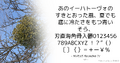 light option example
 -
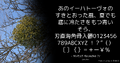 color option example
 -
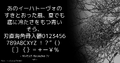 flip option example
 -
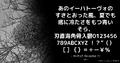 bold option example
 -
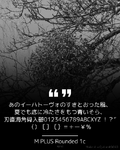 new option example
 -
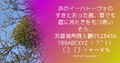 theme option example


Text and emoji
For Discord messages, Make it a Quote preserves supported message formatting, including bold, italic, underline, strikethrough, and block quotes. Formatting that is not rendered in the Quote is removed without removing its text.
Unicode emoji are rendered as emoji images. Discord custom emoji are resolved from their emoji identifiers. When content originates from Misskey, the originating instance is used to resolve custom emoji such as :emoji_name: and :emoji_name@host:.
Discord settings
Users can save default values for the image options, select their language, choose whether the option controls are displayed, and prevent Quotes from being generated from all of their messages or only from messages containing spoilers. Users can also control whether Custom Quote may use their identity.
Server administrators can configure the bot language, generation cooldown, allowed or blocked roles, and channels in which every message is quoted without a mention. Generated Quotes can also be redirected to another channel.
The Discord interface is available in Arabic, Dutch, English, Esperanto, French, German, Hungarian, Italian, Japanese, Japanese in the Kansai dialect, Korean, Polish, Brazilian Portuguese, European Portuguese, Russian, Simplified Chinese, Spanish, Traditional Chinese, Turkish, and Ukrainian.
History
Make it a Quote began as an idea by suzuneu and was subsequently developed with Khsmty. As its operating costs and maintenance needs grew, the service was transferred to Neodyland, and both developers joined the organization.
The service initially focused on Discord. It later expanded to Misskey and the wider Fediverse, followed by Bluesky.
Neodyland currently operates and maintains Make it a Quote, including its website, platform integrations, and image generation system.
Development
The current image generator and Discord integration are implemented primarily in Rust. The Bluesky integration is implemented in TypeScript.
The source code for the image generator and the Discord and Bluesky integrations is proprietary and is not publicly available.
Some supporting resources, including Discord localization data, are maintained publicly through the miq4d organization on GitHub.
Gallery
-
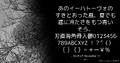 Quote Example
 -
 Icon (Discord)
 -
 Icon (Bluesky)
 -
 Icon (Misskey)
 -
 Icon (3-Color)


