
Make it a Quote/en: Difference between revisions
More actions
Updating to match new version of source page |
Updating to match new version of source page |
||
| Line 2: | Line 2: | ||
{{Infobox service | {{Infobox service | ||
| name = Make it a Quote | | name = Make it a Quote | ||
| tagline = | | tagline = | ||
| logo = Make_it_a_Quote_Black_Icon.png | | logo = Make_it_a_Quote_Black_Icon.png | ||
| logo_size = 200px | | logo_size = 200px | ||
| Line 8: | Line 8: | ||
| status = stable | | status = stable | ||
| type = [[w:Discord|Discord]] & [[w:Bluesky|Bluesky]] Bot | | type = [[w:Discord|Discord]] & [[w:Bluesky|Bluesky]] Bot | ||
| description = Make it a Quote | | description = Make it a Quote creates Quote images from messages and social-media posts. It is compatible with [[w:Discord|Discord]], [[w:Misskey|Misskey]] ([[w:Fediverse|Fediverse]]), and [[w:Bluesky|Bluesky]]. | ||
| provider = {{ll|Neodyland}} | | provider = {{ll|Neodyland}} | ||
| developer = {{ll|Neodyland}} | | developer = {{ll|Neodyland}} | ||
| Line 16: | Line 16: | ||
* Bluesky: {{Date|2023|7|27|class=dtstart}} | * Bluesky: {{Date|2023|7|27|class=dtstart}} | ||
}} | }} | ||
| version = | | version = | ||
| updated = | | updated = | ||
| platform = Discord, Bluesky, Misskey | | platform = Discord, Bluesky, Misskey | ||
| availability = | | availability = | ||
| languages = {{Plainlist| | | languages = {{Plainlist| | ||
* {{#language:ar|{{PAGELANGUAGE}}}} | |||
* {{#language:de|{{PAGELANGUAGE}}}} | * {{#language:de|{{PAGELANGUAGE}}}} | ||
* {{#language:en-US|{{PAGELANGUAGE}}}} | * {{#language:en-US|{{PAGELANGUAGE}}}} | ||
| Line 41: | Line 42: | ||
* {{#language:zh-Hant|{{PAGELANGUAGE}}}} | * {{#language:zh-Hant|{{PAGELANGUAGE}}}} | ||
}} | }} | ||
| access = | | access = | ||
| license = Proprietary | | license = Proprietary | ||
| website = {{URL|https://miq.moe}} | | website = {{URL|https://miq.moe}} | ||
| status_page = | | status_page = | ||
| documentation = | | documentation = | ||
| source = | | source = | ||
| support = {{URL|https://miq.moe/support}} | | support = {{URL|https://miq.moe/support}} | ||
}} | }} | ||
'''Make it a Quote''' is | '''Make it a Quote''' is a Quote-image service and collection of social-media bots operated by {{ll|Neodyland}}. It turns a message or post into a shareable image containing its text, the author's display name and username, and their avatar. | ||
The service is available on Discord, Bluesky, and services in the Fediverse, including Misskey. The way a Quote is requested differs between platforms, while the generated images share the same basic designs and options. | |||
== Operation == | == Operation == | ||
On Discord, Make it a Quote | On Discord, users can reply to a message and mention the bot. They can also use the {{code|Make it a Quote}} message command from Discord's Apps menu. The bot replies with a generated Quote image. | ||
The | On Bluesky, users reply to a post and mention the {{code|@miq.moe}} account. The requesting account must follow the bot. The bot generates a Quote from the parent post and publishes it as an image reply. A separate removal account is available for requesting deletion of an image posted by the bot. | ||
On Discord, a generated Quote includes controls for changing compatible options and selecting a font or theme. The author of the quoted message and the user who generated it can remove the generated response. | |||
Discord also provides Custom Quote. It creates a Quote from user-entered text and attributes it to a selected server member. Custom Quote is generated only when the applicable user and server settings allow it. | |||
== Options == | == Options == | ||
Generation options can be written after the bot mention. Boolean options have a full name and a one-letter alias. On Discord, options specified for a request override the user's saved defaults. | |||
=== light (l) === | === light (l) === | ||
Specifying {{code|light}} or {{code|l}} uses the white design. | |||
The avatar is shown in color in the white design, so the separate [[#color_(c)|{{code|color}}]] option has no additional visual effect while {{code|light}} is active. | |||
=== color (c) === | === color (c) === | ||
In the default dark design, the avatar is normally shown in grayscale. Specifying {{code|color}} or {{code|c}} keeps it in full color. | |||
=== flip (f) === | === flip (f) === | ||
Specifying {{code|flip}} or {{code|f}} swaps the placement of the avatar and text in the standard layout. It has no effect on the [[#new_(n)|{{code|new}}]] layout. | |||
=== bold (b) === | === bold (b) === | ||
Specifying {{code|bold}} or {{code|b}} draws the Quote text in bold. On Discord, enabling this option selects M PLUS Rounded 1c as the font. | |||
=== new (n) === | === new (n) === | ||
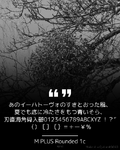
Specifying {{code|new}} or {{code|n}} uses a portrait design with the avatar above the text instead of the standard landscape design. | |||
=== font === | === font === | ||
{{Main|Special:MyLanguage/Make it a Quote/Fonts}} | {{Main|Special:MyLanguage/Make it a Quote/Fonts}} | ||
A font can be selected by specifying an option such as {{code|font{{=}}dot}}. If the selected font does not contain a character, Make it a Quote normally uses another bundled font for that character. The default font selection distinguishes Japanese, Simplified Chinese, and Traditional Chinese text. | |||
{{ll|Make it a Quote/Fonts|'''Please click here for the list of available fonts.'''}} | {{ll|Make it a Quote/Fonts|'''Please click here for the list of available fonts.'''}} | ||
=== theme === | === theme === | ||
{{Main|Special:MyLanguage/Make it a Quote/Themes}} | {{Main|Special:MyLanguage/Make it a Quote/Themes}} | ||
Donors can select a theme by specifying {{code|theme{{=}}<theme name>}} or one of its aliases. A non-default theme determines its own background and text colors and uses the standard landscape design; {{code|light}}, {{code|color}}, and {{code|new}} do not apply while it is selected. | |||
{{ll|Make it a Quote/Themes|'''Please click here for the list of available themes.'''}} | {{ll|Make it a Quote/Themes|'''Please click here for the list of available themes.'''}} | ||
| Line 97: | Line 98: | ||
</gallery> | </gallery> | ||
== Text and emoji == | |||
For Discord messages, Make it a Quote preserves supported message formatting, including bold, italic, underline, strikethrough, and block quotes. Formatting that is not rendered in the Quote is removed without removing its text. | |||
Unicode emoji are rendered as emoji images. Discord custom emoji are resolved from their emoji identifiers. When content originates from Misskey, the originating instance is used to resolve custom emoji such as {{code|:emoji_name:}} and {{code|:emoji_name@host:}}. | |||
== Discord settings == | |||
Users can save default values for the image options, select their language, choose whether the option controls are displayed, and prevent Quotes from being generated from all of their messages or only from messages containing spoilers. Users can also control whether Custom Quote may use their identity. | |||
Server administrators can configure the bot language, generation cooldown, allowed or blocked roles, and channels in which every message is quoted without a mention. Generated Quotes can also be redirected to another channel. | |||
The Discord interface is available in Arabic, Dutch, English, Esperanto, French, German, Hungarian, Italian, Japanese, Japanese in the Kansai dialect, Korean, Polish, Brazilian Portuguese, European Portuguese, Russian, Simplified Chinese, Spanish, Traditional Chinese, Turkish, and Ukrainian. | |||
== History == | == History == | ||
Make it a Quote | Make it a Quote began as an idea by suzuneu and was subsequently developed with Khsmty. As its operating costs and maintenance needs grew, the service was transferred to Neodyland, and both developers joined the organization. | ||
The service | The service initially focused on Discord. It later expanded to Misskey and the wider Fediverse, followed by Bluesky. | ||
Neodyland currently operates and maintains Make it a Quote, including its website, platform integrations, and image generation system. | |||
== Development == | == Development == | ||
The current image generator and Discord integration are implemented primarily in [[w:Rust (programming language)|Rust]]. The Bluesky integration is implemented in [[w:TypeScript|TypeScript]]. | |||
The code for the image | The source code for the image generator and the Discord and Bluesky integrations is proprietary and is not publicly available. | ||
Some supporting resources, including Discord localization data, are maintained publicly through the ''miq4d'' organization on [[w:GitHub|GitHub]]. | |||
== Gallery == | == Gallery == | ||
<gallery> | <gallery> | ||
| Line 123: | Line 128: | ||
== External links == | == External links == | ||
* {{URL|https://miq.moe/|Official website}} | * {{URL|https://subscriber.miq.moe/|Official website}} | ||
* {{URL|https://github.com/miq4d| | * {{URL|https://subscriber.miq.moe/|Subscriber Portal}} | ||
* {{URL|https://github.com/miq4d|miq4d on GitHub}} | |||
* {{URL|https://bsky.app/profile/miq.moe|Make it a Quote on Bluesky}} | * {{URL|https://bsky.app/profile/miq.moe|Make it a Quote on Bluesky}} | ||
[[Category:Make_it_a_Quote|*]] | [[Category:Make_it_a_Quote|*]] | ||
Revision as of 12:15, 18 August 2026
 Make it a QuoteRelease status: stable Make it a QuoteRelease status: stable | |
|---|---|
 | |
| Service type | Discord & Bluesky Bot |
| Description | Make it a Quote creates Quote images from messages and social-media posts. It is compatible with Discord, Misskey (Fediverse), and Bluesky. |
| Provided by | Neodyland |
| Developer(s) | Neodyland |
| Maintainer(s) | Neodyland |
| Initial release |
|
| Platform | Discord, Bluesky, Misskey |
| Languages |
|
| Licence | Proprietary |
| Website | miq.moe |
| Support | miq.moe/support |
Make it a Quote is a Quote-image service and collection of social-media bots operated by Neodyland. It turns a message or post into a shareable image containing its text, the author's display name and username, and their avatar. The service is available on Discord, Bluesky, and services in the Fediverse, including Misskey. The way a Quote is requested differs between platforms, while the generated images share the same basic designs and options.
Operation
On Discord, users can reply to a message and mention the bot. They can also use the Make it a Quote message command from Discord's Apps menu. The bot replies with a generated Quote image.
On Bluesky, users reply to a post and mention the @miq.moe account. The requesting account must follow the bot. The bot generates a Quote from the parent post and publishes it as an image reply. A separate removal account is available for requesting deletion of an image posted by the bot.
On Discord, a generated Quote includes controls for changing compatible options and selecting a font or theme. The author of the quoted message and the user who generated it can remove the generated response.
Discord also provides Custom Quote. It creates a Quote from user-entered text and attributes it to a selected server member. Custom Quote is generated only when the applicable user and server settings allow it.
Options
Generation options can be written after the bot mention. Boolean options have a full name and a one-letter alias. On Discord, options specified for a request override the user's saved defaults.
light (l)
Specifying light or l uses the white design.
The avatar is shown in color in the white design, so the separate color option has no additional visual effect while light is active.
color (c)
In the default dark design, the avatar is normally shown in grayscale. Specifying color or c keeps it in full color.
flip (f)
Specifying flip or f swaps the placement of the avatar and text in the standard layout. It has no effect on the new layout.
bold (b)
Specifying bold or b draws the Quote text in bold. On Discord, enabling this option selects M PLUS Rounded 1c as the font.
new (n)
Specifying new or n uses a portrait design with the avatar above the text instead of the standard landscape design.
font
A font can be selected by specifying an option such as font=dot. If the selected font does not contain a character, Make it a Quote normally uses another bundled font for that character. The default font selection distinguishes Japanese, Simplified Chinese, and Traditional Chinese text.
theme
Donors can select a theme by specifying theme=<theme name> or one of its aliases. A non-default theme determines its own background and text colors and uses the standard landscape design; light, color, and new do not apply while it is selected.
Please click here for the list of available themes.
-
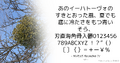 light option example
 -
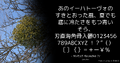 color option example
 -
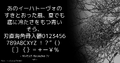 flip option example
 -
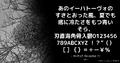 bold option example
 -
 new option example
 -
 theme option example


Text and emoji
For Discord messages, Make it a Quote preserves supported message formatting, including bold, italic, underline, strikethrough, and block quotes. Formatting that is not rendered in the Quote is removed without removing its text.
Unicode emoji are rendered as emoji images. Discord custom emoji are resolved from their emoji identifiers. When content originates from Misskey, the originating instance is used to resolve custom emoji such as :emoji_name: and :emoji_name@host:.
Discord settings
Users can save default values for the image options, select their language, choose whether the option controls are displayed, and prevent Quotes from being generated from all of their messages or only from messages containing spoilers. Users can also control whether Custom Quote may use their identity. Server administrators can configure the bot language, generation cooldown, allowed or blocked roles, and channels in which every message is quoted without a mention. Generated Quotes can also be redirected to another channel. The Discord interface is available in Arabic, Dutch, English, Esperanto, French, German, Hungarian, Italian, Japanese, Japanese in the Kansai dialect, Korean, Polish, Brazilian Portuguese, European Portuguese, Russian, Simplified Chinese, Spanish, Traditional Chinese, Turkish, and Ukrainian.
History
Make it a Quote began as an idea by suzuneu and was subsequently developed with Khsmty. As its operating costs and maintenance needs grew, the service was transferred to Neodyland, and both developers joined the organization. The service initially focused on Discord. It later expanded to Misskey and the wider Fediverse, followed by Bluesky. Neodyland currently operates and maintains Make it a Quote, including its website, platform integrations, and image generation system.
Development
The current image generator and Discord integration are implemented primarily in Rust. The Bluesky integration is implemented in TypeScript. The source code for the image generator and the Discord and Bluesky integrations is proprietary and is not publicly available. Some supporting resources, including Discord localization data, are maintained publicly through the miq4d organization on GitHub.
Gallery
-
 Quote Example
 -
 Icon (Discord)
 -
 Icon (Bluesky)
 -
 Icon (Misskey)
 -
 Icon (3-Color)


