
Make it a Quote: Difference between revisions
More actions
Wrap remaining references in translation variables |
Marked this version for translation |
||
| Line 7: | Line 7: | ||
| logo_alt = | | logo_alt = | ||
| status = stable | | status = stable | ||
| type = <translate>[[w:Discord|Discord]] & [[w:Bluesky|Bluesky]] Bot</translate> | | type = <translate><!--T:1--> [[w:Discord|Discord]] & [[w:Bluesky|Bluesky]] Bot</translate> | ||
| description = <translate>Make it a Quote is a bot that allows you to create a Quote from your content. It is compatible with [[w:Discord|Discord]], [[w:Misskey|Misskey]] ([[w:Fediverse|Fediverse]]), and [[w:Bluesky|Bluesky]].</translate> | | description = <translate><!--T:2--> Make it a Quote is a bot that allows you to create a Quote from your content. It is compatible with [[w:Discord|Discord]], [[w:Misskey|Misskey]] ([[w:Fediverse|Fediverse]]), and [[w:Bluesky|Bluesky]].</translate> | ||
| provider = {{ll|Neodyland}} | | provider = {{ll|Neodyland}} | ||
| developer = {{ll|Neodyland}} | | developer = {{ll|Neodyland}} | ||
| Line 29: | Line 29: | ||
* {{#language:it|{{PAGELANGUAGE}}}} | * {{#language:it|{{PAGELANGUAGE}}}} | ||
* {{#language:ja|{{PAGELANGUAGE}}}} | * {{#language:ja|{{PAGELANGUAGE}}}} | ||
* <translate>Japanese (Kansai-Ben)</translate> | * <translate><!--T:3--> Japanese (Kansai-Ben)</translate> | ||
* {{#language:ko|{{PAGELANGUAGE}}}} | * {{#language:ko|{{PAGELANGUAGE}}}} | ||
* {{#language:nl|{{PAGELANGUAGE}}}} | * {{#language:nl|{{PAGELANGUAGE}}}} | ||
| Line 42: | Line 42: | ||
}} | }} | ||
| access = | | access = | ||
| license = <translate>Proprietary</translate> | | license = <translate><!--T:4--> Proprietary</translate> | ||
| website = {{URL|https://miq.moe}} | | website = {{URL|https://miq.moe}} | ||
| status_page = | | status_page = | ||
| Line 50: | Line 50: | ||
}} | }} | ||
<translate> | <translate> | ||
<!--T:5--> | |||
'''Make it a Quote''' is an online quote-image generator and social media bot operated by {{ll|Neodyland}}. The service converts messages or social-media posts into stylized images resembling typographic quotations, typically combining the quoted text with the author's name and profile image.<tvar name=ref-official><ref name="official">{{Cite web|url=https://miq.moe/en-US|title=Make it a Quote – official website|accessdate=2026-08-15}}</ref></tvar> | '''Make it a Quote''' is an online quote-image generator and social media bot operated by {{ll|Neodyland}}. The service converts messages or social-media posts into stylized images resembling typographic quotations, typically combining the quoted text with the author's name and profile image.<tvar name=ref-official><ref name="official">{{Cite web|url=https://miq.moe/en-US|title=Make it a Quote – official website|accessdate=2026-08-15}}</ref></tvar> | ||
</translate> | </translate> | ||
<translate> | <translate> | ||
<!--T:6--> | |||
Make it a Quote is available on Discord, Bluesky, and services in the Fediverse, including Misskey.<tvar name=ref-official><ref name="official" /></tvar> On supported platforms, users can invoke the bot in a reply to another user's content, after which the service generates a shareable image based on the referenced message or post. | Make it a Quote is available on Discord, Bluesky, and services in the Fediverse, including Misskey.<tvar name=ref-official><ref name="official" /></tvar> On supported platforms, users can invoke the bot in a reply to another user's content, after which the service generates a shareable image based on the referenced message or post. | ||
</translate> | </translate> | ||
<translate> | <translate> | ||
== Operation == | == Operation == <!--T:7--> | ||
<!--T:8--> | |||
On Discord, Make it a Quote is primarily invoked by mentioning the bot while replying to a message. The bot then renders the contents of the replied-to message as a quote image.<tvar name=ref-dbl><ref name="dbl">{{Cite web|url=https://discordbotlist.com/bots/make-it-a-quote|title=Make it a Quote Discord Bot|publisher=Discord Bot List|accessdate=2026-08-15}}</ref></tvar> | On Discord, Make it a Quote is primarily invoked by mentioning the bot while replying to a message. The bot then renders the contents of the replied-to message as a quote image.<tvar name=ref-dbl><ref name="dbl">{{Cite web|url=https://discordbotlist.com/bots/make-it-a-quote|title=Make it a Quote Discord Bot|publisher=Discord Bot List|accessdate=2026-08-15}}</ref></tvar> | ||
</translate> | </translate> | ||
<translate> | <translate> | ||
<!--T:9--> | |||
The Bluesky version operates in a similar manner. Users can mention the Make it a Quote account in a reply to a post to generate an image from that post. A separate removal account is provided for requesting deletion of an image generated by the service.<tvar name=ref-bluesky><ref name="bluesky">{{Cite web|url=https://bsky.app/profile/miq.moe|title=Make it a Quote (@miq.moe)|publisher=Bluesky|accessdate=2026-08-15}}</ref></tvar> | The Bluesky version operates in a similar manner. Users can mention the Make it a Quote account in a reply to a post to generate an image from that post. A separate removal account is provided for requesting deletion of an image generated by the service.<tvar name=ref-bluesky><ref name="bluesky">{{Cite web|url=https://bsky.app/profile/miq.moe|title=Make it a Quote (@miq.moe)|publisher=Bluesky|accessdate=2026-08-15}}</ref></tvar> | ||
</translate> | </translate> | ||
<translate> | <translate> | ||
<!--T:10--> | |||
They support options that alter the appearance of generated images. These include a light background, a colored rather than monochrome profile image, horizontal flipping, bold text, and selection of {{ll|Make it a Quote/Fonts|different fonts}}.<tvar name=ref-dbl><ref name="dbl" /></tvar> The service's website also describes multiple quote-image designs.<tvar name=ref-official><ref name="official" /></tvar> | They support options that alter the appearance of generated images. These include a light background, a colored rather than monochrome profile image, horizontal flipping, bold text, and selection of {{ll|Make it a Quote/Fonts|different fonts}}.<tvar name=ref-dbl><ref name="dbl" /></tvar> The service's website also describes multiple quote-image designs.<tvar name=ref-official><ref name="official" /></tvar> | ||
</translate> | </translate> | ||
<translate> | <translate> | ||
== Options == | == Options == <!--T:11--> | ||
<!--T:12--> | |||
There are various image generation options in Make it a Quote. | There are various image generation options in Make it a Quote. | ||
</translate> | </translate> | ||
<translate> | <translate> | ||
=== light (l) === | === light (l) === <!--T:13--> | ||
<!--T:14--> | |||
By specifying <tvar name=light>{{code|light}}</tvar> or <tvar name=l>{{code|l}}</tvar>, you can make the Quote background white. | By specifying <tvar name=light>{{code|light}}</tvar> or <tvar name=l>{{code|l}}</tvar>, you can make the Quote background white. | ||
<!--T:15--> | |||
As a side effect, [[#color_(c)|{{code|color}}]] is automatically applied. | As a side effect, [[#color_(c)|{{code|color}}]] is automatically applied. | ||
</translate> | </translate> | ||
<translate> | <translate> | ||
=== color (c) === | === color (c) === <!--T:16--> | ||
<!--T:17--> | |||
Normally, the avatar used for a Quote is in grayscale. Specifying <tvar name=color>{{code|color}}</tvar> or <tvar name=c>{{code|c}}</tvar> keeps the avatar in full color. | Normally, the avatar used for a Quote is in grayscale. Specifying <tvar name=color>{{code|color}}</tvar> or <tvar name=c>{{code|c}}</tvar> keeps the avatar in full color. | ||
<!--T:18--> | |||
This option is automatically enabled when [[#light_(l)|{{code|light}}]] is active. | This option is automatically enabled when [[#light_(l)|{{code|light}}]] is active. | ||
</translate> | </translate> | ||
<translate> | <translate> | ||
=== flip (f) === | === flip (f) === <!--T:19--> | ||
<!--T:20--> | |||
You can horizontally flip the placement of a Quote by specifying <tvar name=flip>{{code|flip}}</tvar> or <tvar name=f>{{code|f}}</tvar>. | You can horizontally flip the placement of a Quote by specifying <tvar name=flip>{{code|flip}}</tvar> or <tvar name=f>{{code|f}}</tvar>. | ||
</translate> | </translate> | ||
<translate> | <translate> | ||
=== bold (b) === | === bold (b) === <!--T:21--> | ||
<!--T:22--> | |||
You can make text bold by specifying <tvar name=bold>{{code|bold}}</tvar> or <tvar name=b>{{code|b}}</tvar>. This is not supported by some fonts. | You can make text bold by specifying <tvar name=bold>{{code|bold}}</tvar> or <tvar name=b>{{code|b}}</tvar>. This is not supported by some fonts. | ||
</translate> | </translate> | ||
<translate> | <translate> | ||
=== new (n) === | === new (n) === <!--T:23--> | ||
<!--T:24--> | |||
You can change the design of the quote by specifying <tvar name=new>{{code|new}}</tvar> or <tvar name=n>{{code|n}}</tvar>. | You can change the design of the quote by specifying <tvar name=new>{{code|new}}</tvar> or <tvar name=n>{{code|n}}</tvar>. | ||
</translate> | </translate> | ||
<translate> | <translate> | ||
<!--T:25--> | |||
=== font === | === font === | ||
{{Main|Special:MyLanguage/Make it a Quote/Fonts}} | {{Main|Special:MyLanguage/Make it a Quote/Fonts}} | ||
| Line 106: | Line 120: | ||
</translate> | </translate> | ||
{{ll|Make it a Quote/Fonts|'''<translate>Please click here for the list of available fonts.</translate>'''}} | {{ll|Make it a Quote/Fonts|'''<translate><!--T:26--> Please click here for the list of available fonts.</translate>'''}} | ||
<translate> | <translate> | ||
<!--T:27--> | |||
=== theme === | === theme === | ||
{{Main|Special:MyLanguage/Make it a Quote/Themes}} | {{Main|Special:MyLanguage/Make it a Quote/Themes}} | ||
| Line 113: | Line 128: | ||
</translate> | </translate> | ||
{{ll|Make it a Quote/Themes|'''<translate>Please click here for the list of available themes.</translate>'''}} | {{ll|Make it a Quote/Themes|'''<translate><!--T:28--> Please click here for the list of available themes.</translate>'''}} | ||
<gallery> | <gallery> | ||
Quote_Example_mplus_light.png|<translate>light option example</translate> | Quote_Example_mplus_light.png|<translate><!--T:29--> light option example</translate> | ||
Quote_Example_mplus.png|<translate>color option example</translate> | Quote_Example_mplus.png|<translate><!--T:30--> color option example</translate> | ||
Quote_Example_mplus_flip.png|<translate>flip option example</translate> | Quote_Example_mplus_flip.png|<translate><!--T:31--> flip option example</translate> | ||
Quote_Example_mplus_bold.png|<translate>bold option example</translate> | Quote_Example_mplus_bold.png|<translate><!--T:32--> bold option example</translate> | ||
Quote_Example_mplus_new.png|<translate>new option example</translate> | Quote_Example_mplus_new.png|<translate><!--T:33--> new option example</translate> | ||
Quote_Theme_Example_mplus_Strawberry_Lemonade.png|<translate>theme option example</translate> | Quote_Theme_Example_mplus_Strawberry_Lemonade.png|<translate><!--T:34--> theme option example</translate> | ||
</gallery> | </gallery> | ||
<translate> | <translate> | ||
== History == | == History == <!--T:35--> | ||
<!--T:36--> | |||
Make it a Quote was initially associated primarily with Discord. Make it a Quote originally started as an idea by suzuneu. Afterward, they collaborated with Khsmty, but due to increasing server costs, the service was transferred to Neodyland, and suzuneu and Khsmty became Neodyland members. Its official Discord support server was created on 19 March 2022.<tvar name=ref-discordserver><ref name="discordserver">{{Cite web|url=https://discord.com/servers/make-it-a-quote-954552825902411786|title=Make it a Quote|publisher=Discord|accessdate=2026-08-15}}</ref></tvar> The server is used for technical support, bug reports, feature suggestions, and testing of the bot.<tvar name=ref-discordserver-2><ref name="discordserver" /></tvar> | Make it a Quote was initially associated primarily with Discord. Make it a Quote originally started as an idea by suzuneu. Afterward, they collaborated with Khsmty, but due to increasing server costs, the service was transferred to Neodyland, and suzuneu and Khsmty became Neodyland members. Its official Discord support server was created on 19 March 2022.<tvar name=ref-discordserver><ref name="discordserver">{{Cite web|url=https://discord.com/servers/make-it-a-quote-954552825902411786|title=Make it a Quote|publisher=Discord|accessdate=2026-08-15}}</ref></tvar> The server is used for technical support, bug reports, feature suggestions, and testing of the bot.<tvar name=ref-discordserver-2><ref name="discordserver" /></tvar> | ||
</translate> | </translate> | ||
<translate> | <translate> | ||
<!--T:37--> | |||
The service was later expanded beyond Discord. A Make it a Quote account on the Misskey.io server was established by September 2023, extending the quote-image concept to Misskey and the wider Fediverse.<tvar name=ref-timeline><ref name="timeline">{{Cite web|url=https://yuinoid.neocities.org/txt/my_dsns_timeline|title=分散 SNS関連年表|publisher=100%health|accessdate=2026-08-15}}</ref></tvar> Make it a Quote subsequently became available for Bluesky as well.<tvar name=ref-bluesky><ref name="bluesky" /></tvar> | The service was later expanded beyond Discord. A Make it a Quote account on the Misskey.io server was established by September 2023, extending the quote-image concept to Misskey and the wider Fediverse.<tvar name=ref-timeline><ref name="timeline">{{Cite web|url=https://yuinoid.neocities.org/txt/my_dsns_timeline|title=分散 SNS関連年表|publisher=100%health|accessdate=2026-08-15}}</ref></tvar> Make it a Quote subsequently became available for Bluesky as well.<tvar name=ref-bluesky><ref name="bluesky" /></tvar> | ||
</translate> | </translate> | ||
<translate> | <translate> | ||
<!--T:38--> | |||
The project's website and legal documents identify Neodyland as the organization responsible for the service.<tvar name=ref-terms><ref name="terms">{{Cite web|url=https://miq.moe/en-US/terms/|title=Make it a Quote Terms of Use|publisher=Make it a Quote|date=2023-08-31|accessdate=2026-08-15}}</ref></tvar> Neody also lists Make it a Quote among its services.<tvar name=ref-neody><ref name="neody">{{Cite web|url=https://neody.land/ja/services|title=サービス一覧|publisher=Neodyland|accessdate=2026-08-13}}</ref></tvar> | The project's website and legal documents identify Neodyland as the organization responsible for the service.<tvar name=ref-terms><ref name="terms">{{Cite web|url=https://miq.moe/en-US/terms/|title=Make it a Quote Terms of Use|publisher=Make it a Quote|date=2023-08-31|accessdate=2026-08-15}}</ref></tvar> Neody also lists Make it a Quote among its services.<tvar name=ref-neody><ref name="neody">{{Cite web|url=https://neody.land/ja/services|title=サービス一覧|publisher=Neodyland|accessdate=2026-08-13}}</ref></tvar> | ||
</translate> | </translate> | ||
<translate> | <translate> | ||
== Development == | == Development == <!--T:39--> | ||
<!--T:40--> | |||
Publicly accessible components related to Make it a Quote are maintained through the ''miq4d'' organization on [[w:GitHub|GitHub]]. These include localization data, font resources, and software used by the project's Discord support infrastructure.<tvar name=ref-github><ref name="github">{{Cite web|url=https://github.com/miq4d|title=Make it a Quote for Discord|publisher=GitHub|accessdate=2026-08-15}}</ref></tvar> Some components are written in [[w:Rust (programming language)|Rust]] and [[w:TypeScript|TypeScript]].<tvar name=ref-github-2><ref name="github" /></tvar> | Publicly accessible components related to Make it a Quote are maintained through the ''miq4d'' organization on [[w:GitHub|GitHub]]. These include localization data, font resources, and software used by the project's Discord support infrastructure.<tvar name=ref-github><ref name="github">{{Cite web|url=https://github.com/miq4d|title=Make it a Quote for Discord|publisher=GitHub|accessdate=2026-08-15}}</ref></tvar> Some components are written in [[w:Rust (programming language)|Rust]] and [[w:TypeScript|TypeScript]].<tvar name=ref-github-2><ref name="github" /></tvar> | ||
</translate> | </translate> | ||
<translate> | <translate> | ||
<!--T:41--> | |||
The code for the image generation engine itself and the code for the Discord/Bluesky bots are proprietary and not publicly available. | The code for the image generation engine itself and the code for the Discord/Bluesky bots are proprietary and not publicly available. | ||
</translate> | </translate> | ||
<translate> | <translate> | ||
<!--T:42--> | |||
The Bluesky version developers are '''suzuneu''' and '''googlefan''', working under Neody.<tvar name=ref-bluesky><ref name="bluesky" /></tvar> | The Bluesky version developers are '''suzuneu''' and '''googlefan''', working under Neody.<tvar name=ref-bluesky><ref name="bluesky" /></tvar> | ||
</translate> | </translate> | ||
<translate> | <translate> | ||
== Usage and community == | == Usage and community == <!--T:43--> | ||
<!--T:44--> | |||
Make it a Quote has achieved widespread use on Discord. As of August 2026, the third-party service Discord Bot List reported that the bot was installed on approximately 1.16 million Discord servers.<tvar name=ref-dbl><ref name="dbl" /></tvar> Because this figure is maintained by an external bot directory and changes over time, it may not represent an exact current installation count. | Make it a Quote has achieved widespread use on Discord. As of August 2026, the third-party service Discord Bot List reported that the bot was installed on approximately 1.16 million Discord servers.<tvar name=ref-dbl><ref name="dbl" /></tvar> Because this figure is maintained by an external bot directory and changes over time, it may not represent an exact current installation count. | ||
</translate> | </translate> | ||
<translate> | <translate> | ||
<!--T:45--> | |||
The official Discord community had more than 26,000 members as of August 2026.<tvar name=ref-discordserver><ref name="discordserver" /></tvar> Discord categorizes the support server under areas including entertainment, memes, customer support, and bots.<tvar name=ref-discordserver-2><ref name="discordserver" /></tvar> | The official Discord community had more than 26,000 members as of August 2026.<tvar name=ref-discordserver><ref name="discordserver" /></tvar> Discord categorizes the support server under areas including entertainment, memes, customer support, and bots.<tvar name=ref-discordserver-2><ref name="discordserver" /></tvar> | ||
</translate> | </translate> | ||
<translate> | <translate> | ||
<!--T:46--> | |||
The generated images are commonly used to reproduce humorous, notable, or out-of-context messages in a visual form that can be shared independently of the original conversation. Unlike conventional quotation-management bots, Make it a Quote focuses on producing an image of the selected content rather than maintaining a textual database of quotations. | The generated images are commonly used to reproduce humorous, notable, or out-of-context messages in a visual form that can be shared independently of the original conversation. Unlike conventional quotation-management bots, Make it a Quote focuses on producing an image of the selected content rather than maintaining a textual database of quotations. | ||
</translate> | </translate> | ||
<translate> | <translate> | ||
== Gallery == | == Gallery == <!--T:47--> | ||
</translate> | </translate> | ||
<gallery> | <gallery> | ||
Quote_Example.png|<translate>Quote Example</translate> | Quote_Example.png|<translate><!--T:48--> Quote Example</translate> | ||
Make_it_a_Quote_Blurple_Icon.png|<translate>Icon (Discord)</translate> | Make_it_a_Quote_Blurple_Icon.png|<translate><!--T:49--> Icon (Discord)</translate> | ||
Make_it_a_Quote_Blue_Icon.jpg|<translate>Icon (Bluesky)</translate> | Make_it_a_Quote_Blue_Icon.jpg|<translate><!--T:50--> Icon (Bluesky)</translate> | ||
Make_it_a_Quote_Lime_Icon.png|<translate>Icon (Misskey)</translate> | Make_it_a_Quote_Lime_Icon.png|<translate><!--T:51--> Icon (Misskey)</translate> | ||
Make_it_a_Quote_Three_Color_Icon.png|<translate>Icon (3-Color)</translate> | Make_it_a_Quote_Three_Color_Icon.png|<translate><!--T:52--> Icon (3-Color)</translate> | ||
</gallery> | </gallery> | ||
<translate> | <translate> | ||
== External links == | == External links == <!--T:53--> | ||
<!--T:54--> | |||
* {{URL|<tvar name=miqmoe>https://miq.moe/</tvar>|Official website}} | * {{URL|<tvar name=miqmoe>https://miq.moe/</tvar>|Official website}} | ||
* {{URL|<tvar name=miq4d>https://github.com/miq4d</tvar>|Make it a Quote on GitHub}} | * {{URL|<tvar name=miq4d>https://github.com/miq4d</tvar>|Make it a Quote on GitHub}} | ||
| Line 175: | Line 200: | ||
</translate> | </translate> | ||
<translate> | <translate> | ||
== References == | == References == <!--T:55--> | ||
</translate> | </translate> | ||
{{Reflist}} | {{Reflist}} | ||
[[Category:Make_it_a_Quote|*]] | [[Category:Make_it_a_Quote|*]] | ||
Revision as of 16:49, 16 August 2026
 Make it a QuoteRelease status: stable Make it a QuoteRelease status: stable | |
|---|---|
 | |
| Service type | Discord & Bluesky Bot |
| Description | Make it a Quote is a bot that allows you to create a Quote from your content. It is compatible with Discord, Misskey (Fediverse), and Bluesky. |
| Provided by | Neodyland |
| Developer(s) | Neodyland |
| Maintainer(s) | Neodyland |
| Initial release |
|
| Platform | Discord, Bluesky, Misskey |
| Languages |
|
| Licence | Proprietary |
| Website | miq.moe |
| Support | miq.moe/support |
Make it a Quote is an online quote-image generator and social media bot operated by Neodyland. The service converts messages or social-media posts into stylized images resembling typographic quotations, typically combining the quoted text with the author's name and profile image.[1] Make it a Quote is available on Discord, Bluesky, and services in the Fediverse, including Misskey.[1] On supported platforms, users can invoke the bot in a reply to another user's content, after which the service generates a shareable image based on the referenced message or post.
Operation
On Discord, Make it a Quote is primarily invoked by mentioning the bot while replying to a message. The bot then renders the contents of the replied-to message as a quote image.[2] The Bluesky version operates in a similar manner. Users can mention the Make it a Quote account in a reply to a post to generate an image from that post. A separate removal account is provided for requesting deletion of an image generated by the service.[3] They support options that alter the appearance of generated images. These include a light background, a colored rather than monochrome profile image, horizontal flipping, bold text, and selection of different fonts.[2] The service's website also describes multiple quote-image designs.[1]
Options
There are various image generation options in Make it a Quote.
light (l)
By specifying light or l, you can make the Quote background white.
As a side effect, color is automatically applied.
color (c)
Normally, the avatar used for a Quote is in grayscale. Specifying color or c keeps the avatar in full color.
This option is automatically enabled when light is active.
flip (f)
You can horizontally flip the placement of a Quote by specifying flip or f.
bold (b)
You can make text bold by specifying bold or b. This is not supported by some fonts.
new (n)
You can change the design of the quote by specifying new or n.
font
You can change the font used for Quotes by specifying something like font=dot.
theme
Supporters can change the theme by specifying theme=<theme name>.
Please click here for the list of available themes.
-
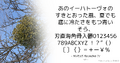 light option example
 -
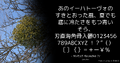 color option example
 -
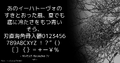 flip option example
 -
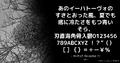 bold option example
 -
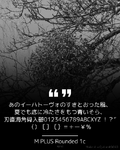 new option example
 -
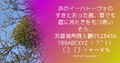 theme option example


History
Make it a Quote was initially associated primarily with Discord. Make it a Quote originally started as an idea by suzuneu. Afterward, they collaborated with Khsmty, but due to increasing server costs, the service was transferred to Neodyland, and suzuneu and Khsmty became Neodyland members. Its official Discord support server was created on 19 March 2022.[4] The server is used for technical support, bug reports, feature suggestions, and testing of the bot.[4] The service was later expanded beyond Discord. A Make it a Quote account on the Misskey.io server was established by September 2023, extending the quote-image concept to Misskey and the wider Fediverse.[5] Make it a Quote subsequently became available for Bluesky as well.[3] The project's website and legal documents identify Neodyland as the organization responsible for the service.[6] Neody also lists Make it a Quote among its services.[7]
Development
Publicly accessible components related to Make it a Quote are maintained through the miq4d organization on GitHub. These include localization data, font resources, and software used by the project's Discord support infrastructure.[8] Some components are written in Rust and TypeScript.[8] The code for the image generation engine itself and the code for the Discord/Bluesky bots are proprietary and not publicly available. The Bluesky version developers are suzuneu and googlefan, working under Neody.[3]
Usage and community
Make it a Quote has achieved widespread use on Discord. As of August 2026, the third-party service Discord Bot List reported that the bot was installed on approximately 1.16 million Discord servers.[2] Because this figure is maintained by an external bot directory and changes over time, it may not represent an exact current installation count. The official Discord community had more than 26,000 members as of August 2026.[4] Discord categorizes the support server under areas including entertainment, memes, customer support, and bots.[4] The generated images are commonly used to reproduce humorous, notable, or out-of-context messages in a visual form that can be shared independently of the original conversation. Unlike conventional quotation-management bots, Make it a Quote focuses on producing an image of the selected content rather than maintaining a textual database of quotations.
Gallery
-
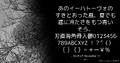 Quote Example
 -
 Icon (Discord)
 -
 Icon (Bluesky)
 -
 Icon (Misskey)
 -
 Icon (3-Color)


External links
References
- ↑ 1.0 1.1 1.2 Make it a Quote – official website. Retrieved on 2026-08-15.
- ↑ 2.0 2.1 2.2 Make it a Quote Discord Bot. Discord Bot List. Retrieved on 2026-08-15.
- ↑ 3.0 3.1 3.2 Make it a Quote (@miq.moe). Bluesky. Retrieved on 2026-08-15.
- ↑ 4.0 4.1 4.2 4.3 Make it a Quote. Discord. Retrieved on 2026-08-15.
- ↑ 分散 SNS関連年表. 100%health. Retrieved on 2026-08-15.
- ↑ Make it a Quote Terms of Use. Make it a Quote (2023-08-31). Retrieved on 2026-08-15.
- ↑ サービス一覧. Neodyland. Retrieved on 2026-08-13.
- ↑ 8.0 8.1 Make it a Quote for Discord. GitHub. Retrieved on 2026-08-15.