
Make it a Quote/ja: Difference between revisions
More actions
Created page with "Discord & w:ja:Bluesky Bot" |
No edit summary |
||
| (34 intermediate revisions by 2 users not shown) | |||
| Line 12: | Line 12: | ||
| logo_alt = | | logo_alt = | ||
| status = stable | | status = stable | ||
| type = [[w:ja:Discord|Discord]] & [[w:ja:Bluesky]] Bot | | type = [[w:ja:Discord|Discord]] & [[w:ja:Bluesky|Bluesky]] Bot | ||
| description = | | description = Make it a Quote は、コンテンツから Quote を作成できる Bot です。[[w:ja:Discord|Discord]]、[[w:ja:Misskey|Misskey]] ([[w:ja:Fediverse|Fediverse]])、[[w:ja:Bluesky|Bluesky]] に対応しています。 | ||
| provider = {{ll|Neodyland}} | | provider = {{ll|Neodyland}} | ||
| developer = {{ll|Neodyland}} | | developer = {{ll|Neodyland}} | ||
| Line 35: | Line 35: | ||
* {{#language:it|{{PAGELANGUAGE}}}} | * {{#language:it|{{PAGELANGUAGE}}}} | ||
* {{#language:ja|{{PAGELANGUAGE}}}} | * {{#language:ja|{{PAGELANGUAGE}}}} | ||
* | * 日本語 (関西弁) | ||
* {{#language:ko|{{PAGELANGUAGE}}}} | * {{#language:ko|{{PAGELANGUAGE}}}} | ||
* {{#language:nl|{{PAGELANGUAGE}}}} | * {{#language:nl|{{PAGELANGUAGE}}}} | ||
| Line 48: | Line 48: | ||
}} | }} | ||
| access = | | access = | ||
| license = | | license = プロプライエタリ | ||
| website = {{URL|https://miq.moe}} | | website = {{URL|https://miq.moe}} | ||
| status_page = | | status_page = | ||
| Line 55: | Line 55: | ||
| support = {{URL|https://miq.moe/support}} | | support = {{URL|https://miq.moe/support}} | ||
}} | }} | ||
'''Make it a Quote'''は、{{ll|Neodyland}} が運営するQuote画像サービスおよびSNS Botです。メッセージやポストを、テキスト、作者の表示名とユーザー名、そしてアバターを含む画像に変換します。 | |||
'''Make it a Quote''' | このサービスはDiscord、Bluesky、そして Misskey を含む Fediverse のサービスで利用可能です。Quote の生成方法はプラットフォームによって異なりますが、生成される画像のデザインやオプションは同じです。 | ||
<span id="Operation"></span> | |||
< | == 使用方法 == | ||
</ | |||
== | |||
Discord では、ユーザーがメッセージの返信で Bot をメンションすることで生成できます。また、Discord のアプリメニューから {{code|Make it a Quote}} メッセージコマンドを使うこともできます。Bot は Quote を生成し、画像で返信します。 | |||
Bluesky では、ユーザーがポストの返信で {{code|@miq.moe}} をメンションすることで生成できます。メンションするアカウントは Bot をフォローしている必要があります。Bot は親投稿から Quote を生成し、返信で公開します。{{code|@remove.miq.moe}} をメンションすると、Bot が投稿した画像を削除できます。 | |||
Discord では、生成された Quote にはオプションの変更やフォントやテーマの選択などの制御パネルが含まれています。Quote されたメッセージの投稿者とそれを生成したユーザーは、生成された Quote を削除できます。 | |||
Discord では Custom Quote も提供しています。ユーザーが入力したテキストから Quote を作成し、それを選択したサーバーメンバーに帰属させます。Custom Quote は、該当するユーザーまたはサーバー設定が許可する場合のみ生成されます。 | |||
Discord | |||
< | <span id="Options"></span> | ||
== | == オプション == | ||
生成オプションは Bot のメンションの後に書くことができます。真偽値のオプションはフルネームとエイリアスがあります。Discord では、メンションで指定されたオプションがユーザーの保存したデフォルトを上書きします。 | |||
=== light (l) === | === light (l) === | ||
{{code|light}} や {{code|l}} を指定すると、Quote に白いデザインが使われます。 | |||
アバターは白いデザインだとカラー表示されているため、[[#color_(c)|{{code|color}}]]オプションは {{code|light}} が有効だと特に何も起こりません。 | |||
=== color (c) === | === color (c) === | ||
デフォルトのダークデザインでは、アバターはグレースケールで表示されます。{{code|color}} または {{code|c}} を指定すると、アバターがカラーのままになります。 | |||
=== flip (f) === | === flip (f) === | ||
{{code|flip}} または{{code|f}} を指定すると、アバターとテキストの配置が入れ替わります。[[#new_(n)|{{code|new}}]] を使用している場合効果はありません。 | |||
=== bold (b) === | === bold (b) === | ||
{{code|bold}} または {{code|b}}を指定すると、Quoteが太字になります。Discordではこのオプションを有効にすると、フォントとしてM PLUS Rounded 1cが選択されます。 | |||
=== new (n) === | === new (n) === | ||
{{code|new}} または {{code|n}}を指定すると、横向きデザインではなく、テキストの上にアバターを配置したポートレートデザインが使用されます。 | |||
=== font === | === font === | ||
{{Main|Special:MyLanguage/Make it a Quote/Fonts}} | {{Main|Special:MyLanguage/Make it a Quote/Fonts}} | ||
{{code|font{{=}}dot}} などのオプションを指定することでフォントを選択できます。選択されたフォントに文字が対応していない場合、Quote にすると通常、その文字には別のフォントが使われます。Quote は、日本語、簡体字、繁体字中国語を自動で識別し、それぞれに異なるデフォルトフォントを使用します。 | |||
{{ll|Make it a Quote/Fonts|''' | {{ll|Make it a Quote/Fonts|'''利用可能なフォント一覧はこちらをクリックしてください。'''}} | ||
=== theme === | === theme === | ||
{{Main|Special:MyLanguage/Make it a Quote/Themes}} | {{Main|Special:MyLanguage/Make it a Quote/Themes}} | ||
サポーターは {{code|theme{{=}}<theme name>}} を指定することでテーマを選択できます。{{code|light}}、{{code|color}}、{{code|new}} はテーマの使用中には効果がありません。 | |||
{{ll|Make it a Quote/Themes|''' | {{ll|Make it a Quote/Themes|'''利用可能なテーマ一覧はこちらをクリックしてください。'''}} | ||
<gallery> | <gallery> | ||
Quote_Example_mplus_light.png| | Quote_Example_mplus_light.png|light オプションの例 | ||
Quote_Example_mplus.png| | Quote_Example_mplus.png|color オプションの例 | ||
Quote_Example_mplus_flip.png| | Quote_Example_mplus_flip.png|flip オプションの例 | ||
Quote_Example_mplus_bold.png| | Quote_Example_mplus_bold.png|bold オプションの例 | ||
Quote_Example_mplus_new.png| | Quote_Example_mplus_new.png|new オプションの例 | ||
Quote_Theme_Example_mplus_Strawberry_Lemonade.png| | Quote_Theme_Example_mplus_Strawberry_Lemonade.png|theme オプションの例 | ||
</gallery> | </gallery> | ||
< | <span id="Text_and_emoji"></span> | ||
== | == テキストと絵文字 == | ||
Discord メッセージの場合、Make it a Quote は、太字、斜体、下線、取り消し線、ブロック引用符などのサポートされたメッセージフォーマットを保持します。対応していない書式は削除されることがあります。 | |||
Unicodeの絵文字は [https://github.com/jdecked/twemoji Twemoji] で表示されます。Discordのカスタム絵文字も表示されます。コンテンツがMisskeyから発信された場合、その元のインスタンスは{{code|:emoji_name:}} や {{code|:emoji_name@host:}} などのカスタム絵文字の解決に使われます。 | |||
<span id="Discord_settings"></span> | |||
== Discord設定 == | |||
< | |||
== | |||
ユーザーは画像オプションのデフォルト値を保存し、言語を選択し、オプションコントロールを表示するかどうかを選べ、すべてのメッセージで Quote の生成を禁止したり、スポイラーを含むメッセージからのみ Quote の生成を禁止したりできます。ユーザーは Custom Quote を有効にするかどうかも設定できます。 | |||
サーバー管理者は Bot の言語、生成クールダウン、ロールによる Quote の許可またはブロック、すべてのメッセージがメンションなしで引用されるチャネルである {{code|Always Quote}} を設定できます。生成された Quote は別のチャンネルにリダイレクトすることも可能です。 | |||
Discord Make it a Quote は、アラビア語、オランダ語、英語、エスペラント語、フランス語、ドイツ語、ハンガリー語、イタリア語、日本語、関西方言の日本語、韓国語、ポーランド語、ブラジルポルトガル語、ヨーロッパポルトガル語、ロシア語、簡体字中国語、スペイン語、繁体字中国語、トルコ語、ウクライナ語に対応しています。 | |||
<span id="History"></span> | |||
== 歴史 == | |||
< | |||
</ | |||
== | |||
Make it a Quoteはすずねーうが初期版を制作し、その後Khsmtyと共に発展しました。運営コストとメンテナンスの必要性が増加したために、サービスはNeodylandに移管され、両開発者はNeodylandに加わりました。 | |||
Make it a | 当初、このサービスは Discord に焦点を当てていましたが、その後、Misskey やより広範な Fediverse へと拡大し、続いて Bluesky でサービスを開始しました。 | ||
Neodylandは現在、ウェブサイト、プラットフォーム連携、画像生成システムを含む Make it a Quote を運営・維持しています。 | |||
<span id="Development"></span> | |||
== 開発 == | |||
< | |||
== | |||
現在の画像ジェネレーターとDiscord Bot は主に[[w:ja:Rust (プログラミング言語)|Rust]]で実装されています。Bluesky Botは[[w:ja:TypeScript|TypeScript]]で実装されています。 | |||
画像生成ツールおよび Discord、Bluesky Botのソースコードはプロプライエタリであり、公開されていません。 | |||
Discordのローカライズデータを含むいくつかのリソースは、[[w:ja:GitHub|GitHub]] で公開されています (''miq4d'' organization)。 | |||
<span id="Gallery"></span> | |||
== ギャラリー == | |||
< | |||
== | |||
<gallery> | <gallery> | ||
Quote_Example.png| | Quote_Example.png|Quote の例 | ||
Make_it_a_Quote_Blurple_Icon.png| | Make_it_a_Quote_Blurple_Icon.png|アイコン (Discord) | ||
Make_it_a_Quote_Blue_Icon.jpg| | Make_it_a_Quote_Blue_Icon.jpg|アイコン (Bluesky) | ||
Make_it_a_Quote_Lime_Icon.png| | Make_it_a_Quote_Lime_Icon.png|アイコン (Misskey) | ||
Make_it_a_Quote_Three_Color_Icon.png| | Make_it_a_Quote_Three_Color_Icon.png|アイコン (3カラー) | ||
</gallery> | </gallery> | ||
< | <span id="External_links"></span> | ||
== | == 外部リンク == | ||
* {{URL|https://miq.moe/|公式ウェブサイト}} | |||
* {{URL|https://miq.moe/| | * {{URL|https://subscriber.miq.moe/|サブスクライバーポータル}} | ||
* {{URL|https://subscriber.miq.moe/| | |||
* {{URL|https://github.com/miq4d|miq4d on GitHub}} | * {{URL|https://github.com/miq4d|miq4d on GitHub}} | ||
* {{URL|https://bsky.app/profile/miq.moe|Make it a Quote | * {{URL|https://bsky.app/profile/miq.moe|Bluesky Make it a Quote}} | ||
[[Category:Make_it_a_Quote|*]] | [[Category:Make_it_a_Quote|*]] | ||
Latest revision as of 12:57, 18 August 2026
 Make it a QuoteRelease status: stable Make it a QuoteRelease status: stable | |
|---|---|
 | |
| Service type | Discord & Bluesky Bot |
| Description | Make it a Quote は、コンテンツから Quote を作成できる Bot です。Discord、Misskey (Fediverse)、Bluesky に対応しています。 |
| Provided by | Neodyland |
| Developer(s) | Neodyland |
| Maintainer(s) | Neodyland |
| Initial release |
|
| Platform | Discord, Bluesky, Misskey |
| Languages |
|
| Licence | プロプライエタリ |
| Website | miq.moe |
| Support | miq.moe/support |
Make it a Quoteは、Neodyland が運営するQuote画像サービスおよびSNS Botです。メッセージやポストを、テキスト、作者の表示名とユーザー名、そしてアバターを含む画像に変換します。 このサービスはDiscord、Bluesky、そして Misskey を含む Fediverse のサービスで利用可能です。Quote の生成方法はプラットフォームによって異なりますが、生成される画像のデザインやオプションは同じです。
使用方法
Discord では、ユーザーがメッセージの返信で Bot をメンションすることで生成できます。また、Discord のアプリメニューから Make it a Quote メッセージコマンドを使うこともできます。Bot は Quote を生成し、画像で返信します。
Bluesky では、ユーザーがポストの返信で @miq.moe をメンションすることで生成できます。メンションするアカウントは Bot をフォローしている必要があります。Bot は親投稿から Quote を生成し、返信で公開します。@remove.miq.moe をメンションすると、Bot が投稿した画像を削除できます。
Discord では、生成された Quote にはオプションの変更やフォントやテーマの選択などの制御パネルが含まれています。Quote されたメッセージの投稿者とそれを生成したユーザーは、生成された Quote を削除できます。
Discord では Custom Quote も提供しています。ユーザーが入力したテキストから Quote を作成し、それを選択したサーバーメンバーに帰属させます。Custom Quote は、該当するユーザーまたはサーバー設定が許可する場合のみ生成されます。
オプション
生成オプションは Bot のメンションの後に書くことができます。真偽値のオプションはフルネームとエイリアスがあります。Discord では、メンションで指定されたオプションがユーザーの保存したデフォルトを上書きします。
light (l)
light や l を指定すると、Quote に白いデザインが使われます。
アバターは白いデザインだとカラー表示されているため、colorオプションは light が有効だと特に何も起こりません。
color (c)
デフォルトのダークデザインでは、アバターはグレースケールで表示されます。color または c を指定すると、アバターがカラーのままになります。
flip (f)
flip またはf を指定すると、アバターとテキストの配置が入れ替わります。new を使用している場合効果はありません。
bold (b)
bold または bを指定すると、Quoteが太字になります。Discordではこのオプションを有効にすると、フォントとしてM PLUS Rounded 1cが選択されます。
new (n)
new または nを指定すると、横向きデザインではなく、テキストの上にアバターを配置したポートレートデザインが使用されます。
font
font=dot などのオプションを指定することでフォントを選択できます。選択されたフォントに文字が対応していない場合、Quote にすると通常、その文字には別のフォントが使われます。Quote は、日本語、簡体字、繁体字中国語を自動で識別し、それぞれに異なるデフォルトフォントを使用します。
theme
サポーターは theme=<theme name> を指定することでテーマを選択できます。light、color、new はテーマの使用中には効果がありません。
-
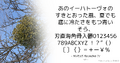 light オプションの例
 -
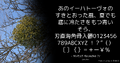 color オプションの例
 -
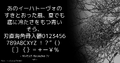 flip オプションの例
 -
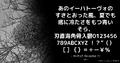 bold オプションの例
 -
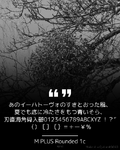 new オプションの例
 -
 theme オプションの例


テキストと絵文字
Discord メッセージの場合、Make it a Quote は、太字、斜体、下線、取り消し線、ブロック引用符などのサポートされたメッセージフォーマットを保持します。対応していない書式は削除されることがあります。
Unicodeの絵文字は Twemoji で表示されます。Discordのカスタム絵文字も表示されます。コンテンツがMisskeyから発信された場合、その元のインスタンスは:emoji_name: や :emoji_name@host: などのカスタム絵文字の解決に使われます。
Discord設定
ユーザーは画像オプションのデフォルト値を保存し、言語を選択し、オプションコントロールを表示するかどうかを選べ、すべてのメッセージで Quote の生成を禁止したり、スポイラーを含むメッセージからのみ Quote の生成を禁止したりできます。ユーザーは Custom Quote を有効にするかどうかも設定できます。
サーバー管理者は Bot の言語、生成クールダウン、ロールによる Quote の許可またはブロック、すべてのメッセージがメンションなしで引用されるチャネルである Always Quote を設定できます。生成された Quote は別のチャンネルにリダイレクトすることも可能です。
Discord Make it a Quote は、アラビア語、オランダ語、英語、エスペラント語、フランス語、ドイツ語、ハンガリー語、イタリア語、日本語、関西方言の日本語、韓国語、ポーランド語、ブラジルポルトガル語、ヨーロッパポルトガル語、ロシア語、簡体字中国語、スペイン語、繁体字中国語、トルコ語、ウクライナ語に対応しています。
歴史
Make it a Quoteはすずねーうが初期版を制作し、その後Khsmtyと共に発展しました。運営コストとメンテナンスの必要性が増加したために、サービスはNeodylandに移管され、両開発者はNeodylandに加わりました。 当初、このサービスは Discord に焦点を当てていましたが、その後、Misskey やより広範な Fediverse へと拡大し、続いて Bluesky でサービスを開始しました。 Neodylandは現在、ウェブサイト、プラットフォーム連携、画像生成システムを含む Make it a Quote を運営・維持しています。
開発
現在の画像ジェネレーターとDiscord Bot は主にRustで実装されています。Bluesky BotはTypeScriptで実装されています。 画像生成ツールおよび Discord、Bluesky Botのソースコードはプロプライエタリであり、公開されていません。 Discordのローカライズデータを含むいくつかのリソースは、GitHub で公開されています (miq4d organization)。
ギャラリー
-
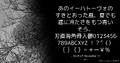 Quote の例
 -
 アイコン (Discord)
 -
 アイコン (Bluesky)
 -
 アイコン (Misskey)
 -
 アイコン (3カラー)


